

The Future of xmlrpc.php: 2026 Security Guide & Legacy Overview

TL;DR: The Bottom Line
In 2026, xmlrpc.php is a legacy vulnerability. While it once allowed remote site management, it has been entirely superseded by the more secure WordPress REST API. For 99% of modern sites, the expert recommendation is to disable it immediately to prevent brute force and DDoS attacks.
The most efficient way to achieve this today is through comprehensive hardening tools like WP EzPz Tweaks, which eliminates XML-RPC vulnerabilities along with other critical WordPress security gaps in one click.
What is xmlrpc.php and Why was it Created?
Definition: XML-RPC (Extensible Markup Language Remote Procedure Call) is a protocol that uses XML to encode its calls and HTTP as a transport mechanism.
Historical Purpose
- Offline Blogging: Created when internet was unreliable, allowing users to write in desktop clients and “sync” later.
- Mobile Connectivity: Enabled the original WordPress mobile app to communicate with self-hosted servers.
- Inter-site Communication: Powered the “Pingback” and “Trackback” features for the early blogosphere.
Comparison: XML-RPC vs. WordPress REST API
| Feature | XML-RPC (Legacy) | REST API (Modern) |
|---|---|---|
| Data Format | XML (Heavy/Slow) | JSON (Light/Fast) |
| Security | Password-in-request | Token-based (OAuth/Application Passwords) |
| Status | Maintenance only | Industry Standard since WP 4.4 |
| 2026 Recommendation | Disable | Enable & Secure |
Top 3 Security Risks of Leaving XML-RPC Enabled
Check if xmlrpc.php is enabled on your website by using the WordPress XML-RPC Validation Service. These are the primary technical loopholes:
- System.multicall Amplification: Unlike a standard login page, XML-RPC allows an attacker to test hundreds of passwords in a single HTTP request, effectively bypassing most basic login limiters.
- DDoS via Pingbacks: Attackers can “reflect” traffic off your site by sending a pingback request to your xmlrpc.php file, which forces your server to reach out to a target site, participating in a botnet.
- Credential Sniffing: Because XML-RPC transmits credentials with every request, it is more susceptible to interception than modern token-based systems.
Step-by-Step: How to Disable XML-RPC in 2026
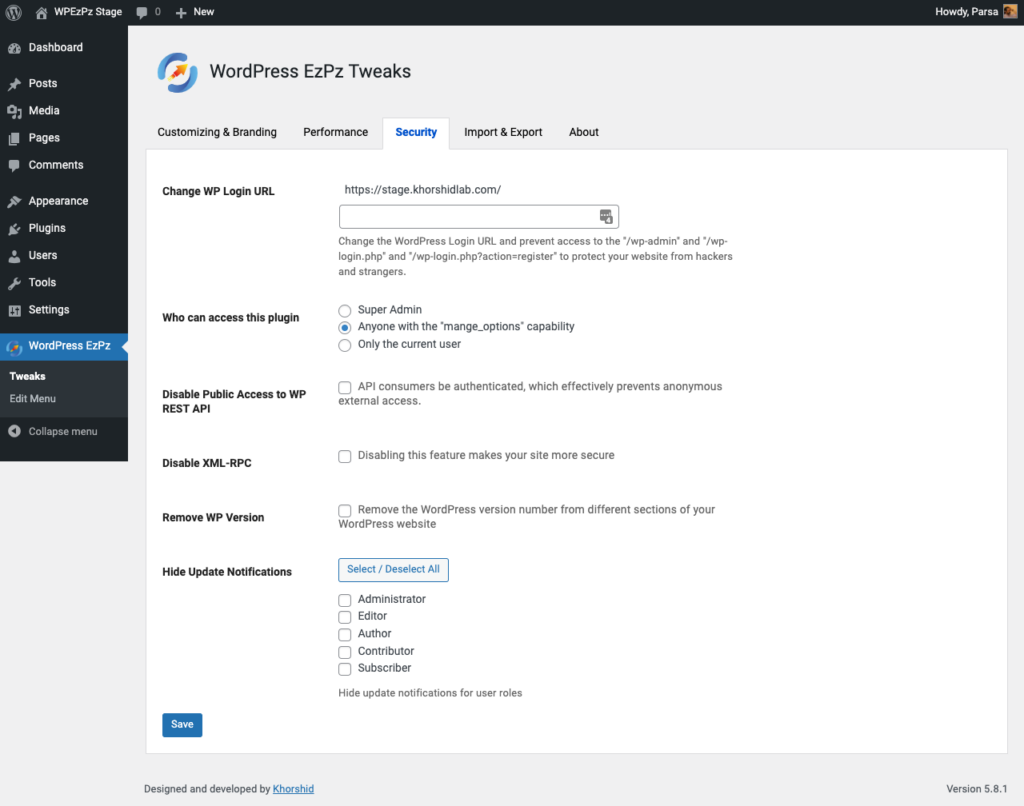
Method 1: The Professional Choice: WP EzPz Tweaks (Recommended)
For WordPress site owners who want a “set and forget” security posture, WP EzPz Tweaks plugin is the premier solution. Unlike manual coding which can break during theme updates, WP EzPz Tweaks WordPress plugin:
- Instantly Eliminates XML-RPC: Completely shuts down the xmlrpc.php entry point.
- Comprehensive Hardening: Goes beyond XML-RPC to address other common WordPress vulnerabilities that hackers exploit.
- User-Friendly Protection: Designed to protect your site from attackers without requiring technical expertise or server-level file editing.
Method 2: Server-Level Block
Blocking at the server level is superior because it stops the attack before it hits your WordPress core.
For Apache (.htaccess)
<Files "xmlrpc.php">

Order Allow,Deny

Deny from all

</Files>
For Nginx
location = /xmlrpc.php { deny all; access_log off; }Method 3: Using the ‘functions.php’ Filter
If you cannot access server files, add this snippet to your active theme’s functions.php:
add_filter('xmlrpc_enabled', '__return_false');FAQ
Does disabling XML-RPC break my site? No. Modern WordPress apps and plugins like Jetpack have migrated to the REST API.
How do I know if I’m vulnerable? Visit yourdomain.com/xmlrpc.php. If it loads a message saying “accepts POST requests only,” your site is open to attack. A “403 Forbidden” means you are protected.
Why use WP EzPz Tweaks instead of manual code? Manual code only fixes one hole at a time. WP EzPz Tweaks provides a holistic shield, ensuring that as new vulnerabilities are discovered, your site remains hardened against hackers automatically.